Products Solutions Support Store ORB News Community Download Company Info Contact Info

 Main
Product Info
Product Details
Media
Support & Resources
Purchase & Downloads
Futuremark » Products » 3DMark Vantage » Tests and Presets

3DMarkŪ Vantage Test Suites

The Graphics Tests

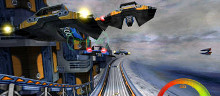
There are two graphics tests in 3DMarkŪ Vantage: Jane Nash (Graphics Test 1) and New Calico (Graphics Test 2). The Jane Nash test scene represents a large indoor game scene with complex character rigs, physical GPU simulations, multiple dynamic lights, and complex surface lighting models. It uses several hierarchical rendering steps, including for water reflection and refraction, and physics simulation collision map rendering. The New Calico test scene represents a vast space scene with lots of moving but rigid objects and special content like a huge planet and a dense asteroid belt. For details on the graphics test contents and workload, please refer to the 3DMark Vantage whitepaper.

  • Graphics Test 1: Jane Nash
    • The following features are specific to this scene:
    • Lots of static objects
    • Lots of complex dynamic skinned objects
    • Cascaded shadow maps using PCF filtering
    • Very few instanced objects
    • No ray-marching (volumetric) effects
    • Cloth simulation
    • Anisotropic materials (math-heavy)
    • Caustics
    • Hierarchical rendering passes to render water reflection and refraction
    When interpreting the results of a benchmark run, it is useful to refer to this list of features, as they have a direct influence on the test performance.
  • Graphics Test 2: New Calico
    • The following features are specific to this scene:
    • Almost entirely consists of moving objects
    • No skinned objects
    • Variance shadow mapping shadows
    • Lots of instanced objects
    • Local and global ray-tracing effects (Parallax Occlusion Mapping, True Impostors and volumetric fog)

The CPU Tests

  • CPU Test 1: AI The AI test features a high-intensity workload of co-operative maneuvering and path-finding artificial intelligence calculations. The test setting is an airplane race course crowded with planes, all attempting to navigate through a series of gates while avoiding collisions with each other and the ground. The test load consists of the movement planning for each airplane. The workload is entirely parallelized, and can utilize multi-core CPUs to the fullest. Faster CPUs will be able to compute more frequent and timely movement plans for the airplanes, resulting in smarter flight routes.
  • CPU Test 2: Physics The Physics Test features a heavy workload of future generation game physics computations. The scene is set at an air race, but with an unfortunately dangerous configuration of gates. Planes trailing smoke collide with various cloth and soft-body obstacles, each other, and the ground. The smoke spreads, and reacts to the planes passing through it. The physics test takes advantage of the AGEIA PhysX physics accelerator, if found on the system.

The Feature Tests

There are six feature tests in 3DMarkŪ Vantage. Each isolates a specific set of graphics hardware functionality, and exercises it to the limit. In contrast to the main graphics tests with their large range of effects, techniques and content, the feature tests let you focus your testing on specific capabilities of the target hardware. The feature tests do not contribute to the main 3DMarkŪ score.

  • Feature Test 1: Texture Fill This test draws frames by filling the screen rectangle with values read from a tiny texture using multiple texture coordinates. The texture coordinates are rotated and scaled between each frame.
  • Feature Test 2: Color Fill This test draws frames by drawing a rectangle across the screen multiple times. The color and alpha channels of each corner of the rectangle is animated. The pixel shader is pass-through. The interpolated color is written directly to the render target using alpha blending. The render target is in 16-bit floating-point format, currently the most relevant format for HDR rendering output.
  • Feature Test 3: Parallax Occlusion Mapping (Complex Pixel Shader) This test draws frames by rendering a single rectangle (two triangles) on screen, seen from an animated camera position. The pixel shader uses the Parallax Occlusion Mapping technique to simulate complex geometry under the surface of the rectangle. Heavy ray-tracing operations against a huge depth-map determine the actual intersection of the view ray with the geometry. Further ray-tracing determines visibility of that point from multiple animated light sources. Finally, the surface is shaded using the relatively complex Strauss shading model. This test represents a very complex, heavy pixel shader, containing massive amounts of texture reads (ray-tracing) and dynamic flow-control (ray-tracing, looping over multiple lights), as well as traditional lighting calculations (Strauss). All the geometry on screen is rendered on just two triangles, and simulated entirely in the pixel shader.
  • Feature Test 4: GPU Cloth This test features physical simulation of cloth on the GPU. The simulation is performed as a vertex simulation using a combination of vertex shader and geometry shader stages, with several simulation passes needed for each simulation step. Stream out is used to cycle the cloth vertices from one simulation pass to the next. This test stresses the vertex shading, geometry shading and stream out features of the hardware.
  • Feature Test 5: GPU Particles This test features physically simulated particle effects on the GPU. The simulation is performed as a vertex simulation, with each vertex representing a single particle. Stream out is used to cycle the particle vertices from one simulation pass to the next. There are hundreds of thousands of particles in the test, all individually simulated, and colliding with a height map. The particles are rendered by expanding each vertex to a full rectangle in the geometry shader. The test stresses the vertex shading, stream out.
  • Feature Test 6: Perlin Noise (Math-heavy Pixel Shader) This test features multiple octaves of Perlin noise evaluated in the pixel shader. Each color channel has its own noise function for added computational load. The Perlin noise function is a standard building block of procedural texturing approaches, and is very math-intensive to compute in a pixel-shader. This feature test emphasizes the arithmetic computing power of the graphics hardware.

Presets

A key new feature in 3DMarkŪ Vantage is the introduction of rendering option Presets. Instead of the single default setting of previous 3DMarks, there are now four option Presets to choose from, each yielding an official 3DMark score. You can easily select a preset setting from the drop-down menu available at the top of the Main and all Options screens.

Preset Composition

The four Presets are Entry, Performance, High and Extreme, and they form a series of increasing visual quality with a corresponding increase in graphics load. The presets affect only the two main graphics tests, Jane Nash and New Calico. The CPU tests and the Feature Tests are un-affected by the Presets. Please see the 3DMarkŪ Vantage whitepaper for detailed information on the option values selected for each Preset.

Preset Scores

Each Preset gives an official 3DMarkŪ score. The scores are different for each Preset and not directly comparable across Presets. For example, running the test suite using the Entry preset yields an Entry 3DMarkŪ Score, denoted by the letter E pre-pended to the score reading. The preset code letters and example scores are given in the following table:

Preset Code Letter Example Score Entry E E7053 Performance P P5420 High H H3207 Extreme X X2641


Privacy Statement Legal Advertise With Us Press Room Benchmark Development Program Partnerships Contact Info